

What is a prohibited term base?
- A prohibited term base is a set of the terms that should be deprecated to use in the specific project. A prohibited term base is used in Quick PE during the verification and re-translation processes in File Editor by linguists (translators and reviewers). You can set up a prohibited term base with the following information.
- Prohibited term base name
- Source language: Since the source texts are verified for the prohibited term base, only the source language needs to be specified. Select from the following options.
- Japanese: ja, ja-JP
- English: en, en-US
- Chinese: zh, zh-CN, zh-TW
- Prohibited term list: You can add prohibited terms one by one manually by clicking [+Add Prohibited Term] button. You can also add several terms in bulk by importing a file (ngwx format). You can also add terms one by one to the imported (existing) prohibited term base manually.
- To add a new prohibited term base: In Prohibited Term Base Details screen, select a ngwx file for "Prohibited Term Base File Name" and click [Import] button. Because once you click [Save] button you cannot import a ngwx file any more, we recommend you to import a ngwx file before adding a new prohibited term.
- To replace an existing prohibited term base: In Prohibited Term Base List screen, click [Import] button in the list. As this is an overwriting import, it will completely replace the selected prohibited term base. The source language setting will not be changed.
- You can edit and delete the prohibited terms in the existing prohibited term base. If there is a lot of terms in the prohibited term list, you can use the term search function to find the necessary term.
<Prohibited Term Base Details screen>
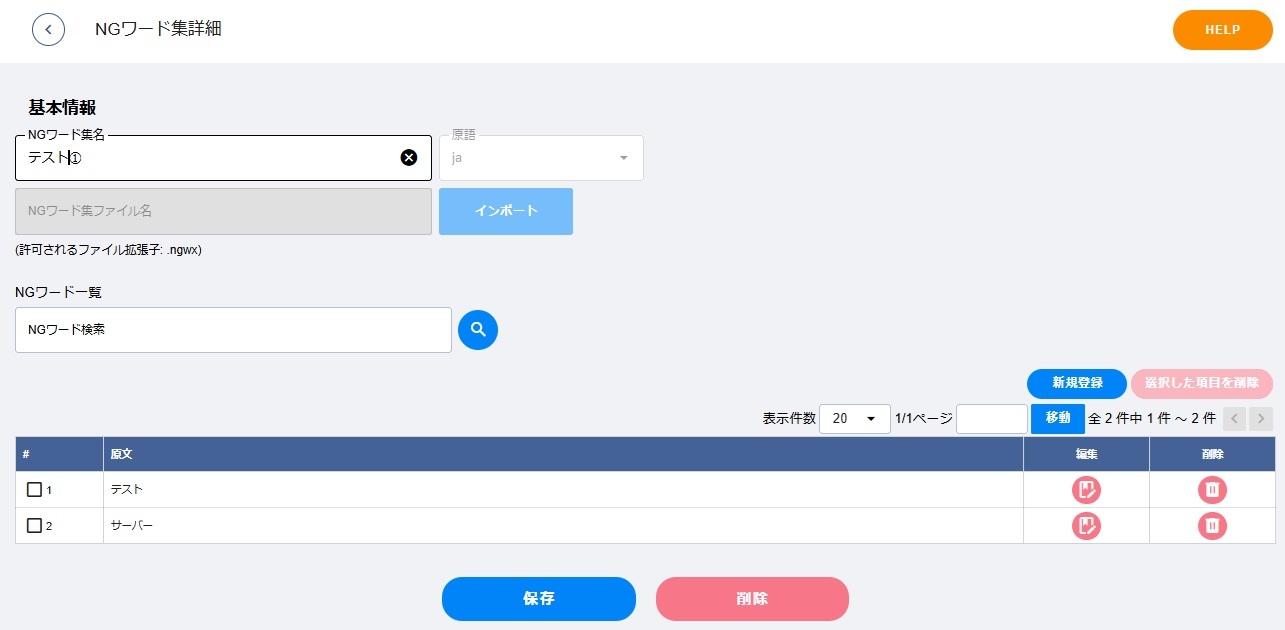 Each project manager can register multiple prohibited term bases. Each term base and prohibited term can be edited and deleted.
How to add a new prohibited term base
Please note that the following restrictions apply to files that can be imported as prohibited term base on Prohibited Term Base Details screen.
- Supported file format and extensions: ngwx
- File size: 500MB
- Number of lines/characters: No restrictions
- Language: The source language is included in the supported language codes
How to specify a prohibited term base to use in a project
- After registering a prohibited term base, you can select prohibited term bases to be available for the group in Group Details screen. Only prohibited term bases registered in the organization can be selected in the screen. You can select multiple prohibited term bases for each group.
- Next, select prohibited term bases to be available for the project in Project Details screen. Only prohibited term bases available for the group, and those source languages is identical to the project's first priority MT engine, can be selected in the screen. You can select multiple prohibited term bases for each project.
- You can delete a prohibited term base even if it is currently being used (selected) by a group or project. If you delete data from [Delete] button at the bottom of Prohibited Term Base Details screen, you will not be able to reference it in the verification process on File Editor screen even if it is already selected on Group Details screen or Project Details screen.
Languages (with or without locale)
- You can select the source language of the prohibited term base from Japanese, English, and Chinese.
- You can set the language code with locale (ja-JP, en-US, zh-CN, zh-TW) as necessary. * These language codes with locale are mainly intended for importing prohibited term base files with locale settings. You can also specify a language code without a locale as the source language of the prohibited term base when you import a file with a locale.
前の記事
Language Asset Management (Data Extraction for Alignment)
次の記事
NG word list management (NG word list)