

Information in Group List screen
This screen displays the list of groups that belong to the organization. You can also search for groups by specifying criteria. To create a new group, click [+ Add Group] button.
- Search criteria area
- Group Name
- List of groups
- Edit: Click Pencil icon to open Group Details screen, where you can view, change, or delete the group information
The relationship of the organization, and groups and projects in Quick PE
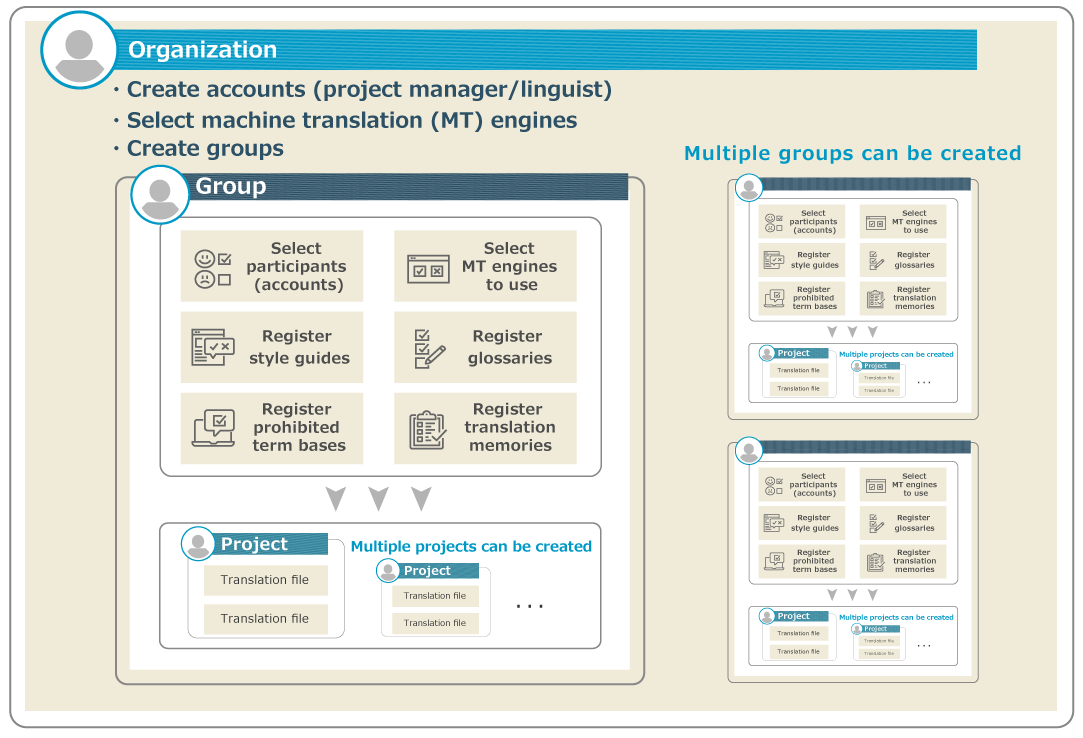
The relationship between the organization, and groups and projects in Quick PE is roughly as follows.
-
A project manager can create one or more groups in his or her organization.
-
The project manager can see a list of the groups registered in the organization to which he or she belongs. Even if you are not a member of a group, you can change the details of the group by referring to the group list and its details screen.
-
For each group, select the accounts that will participate in the group (as a project manager or a linguist) and the MT engines to be available. Also, register your project reference information (style guides, glossaries/LAC glossaries, prohibited term bases, and translation memories/LAC translation memories) as required.
-
Can create multiple projects in a group.
-
In Project Details screen, you can select the necessary information for the project from the accounts, MT engines, and project reference information available for each group, then upload the files for translation (source file) and set up the detailed information for the project.
-
Project managers and linguists can only view a list of projects in which they are involved. They will not be able to view projects in which he or she is not a participant.
前の記事

Account Management (Account Details)
次の記事
Group Management (Group Details)